Using via Managed Package
Jetstream for Salesforce is currently in early access. If you're interested in using it or want to learn more, reach out to our support team or your account manager for more information and to request access.
Jetstream for Salesforce requires a paid subscription.
What is Jetstream for Salesforce?
Jetstream for Salesforce is a Managed Package that allows you to access Jetstream features directly within the Salesforce interface. With the Managed Package, you can run queries, view results, and manage your Jetstream data without leaving Salesforce.
When using the Managed Package, none of your Salesforce record data is processed via Jetstream's servers. Instead, the app uses Salesforce's Canvas SDK to make API calls directly from your browser to Salesforce, ensuring that your data remains secure and private.
Jetstream never stores any Salesforce access tokens or data from the Managed Package, and all interactions with Salesforce are handled securely through the Canvas SDK.
Known Limitations
While the Managed Package provides convenient access to Jetstream features within Salesforce, there are some limitations to be aware of:
- Working with multiple orgs at the same time is not currently supported within the Managed Package.
- For deployment features that work with multiple orgs, you will need to download the metadata and then re-upload in the target org.
- Ability to sync query history between different orgs and platforms (we plan on delivering this as an opt-in feature in the future)
Getting Started
Reach out to our support team for installation instructions.
After the package is installed, an administrator needs to complete two steps before users can access Jetstream for Salesforce:
- Assign the Jetstream permission set to each user who needs access.
- Configure the connected app to pre-authorize those users.
Assign the Jetstream permission set
Assign the Jetstream permission set to every user who needs access to the app. This grants access to the Jetstream app, tab, page, and related user-preference fields.
You can assign it from Setup > Permission Sets > Jetstream > Manage Assignments.
Configure the connected app
Pre-authorize users to provide the smoothest experience. To do this:
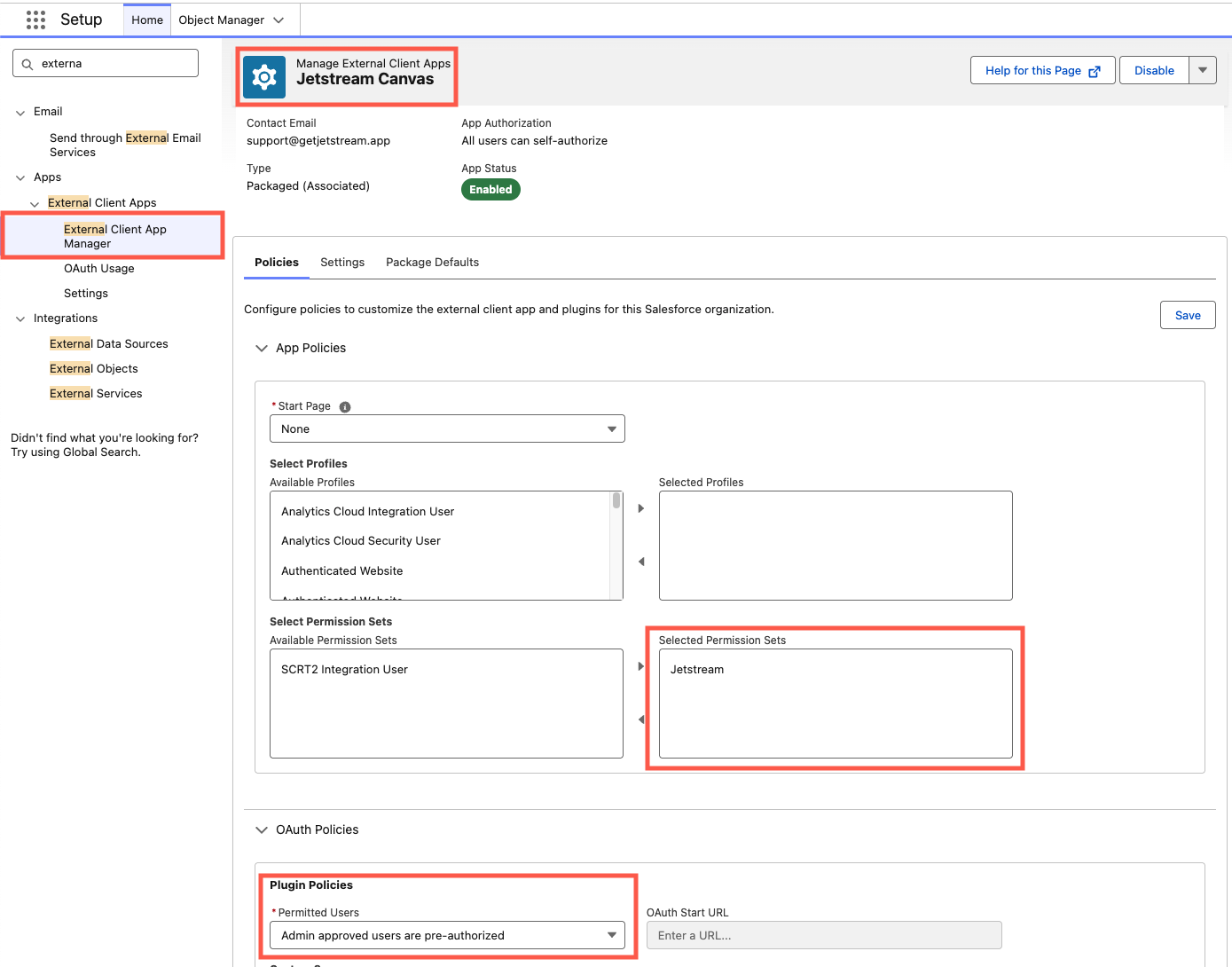
- Navigate to Setup > External Client App Manager in Salesforce
- Find Jetstream for Salesforce in the list and click the name
- Open the Policies tab and click Edit
- Expand the OAuth Policies section and change Permitted Users to Admin approved users are pre-authorized
- Choose a profile or an unmanaged permission set to pre-authorize the users who should have access
When pre-authorizing users, you must choose a profile or an unmanaged permission set. Attempting to use the Jetstream permission set — or any other managed permission set — will result in a save error.
Accessing the App
Open the App Launcher in Salesforce and search for Jetstream, then select it to open the app.
For the best experience, click the Open Fullscreen button to open Jetstream in full-screen mode.
You can also navigate directly to the full-screen page or bookmark it for quick access:
https://{your-domain}.my.salesforce.com/apex/jetstream__JetstreamPage
Troubleshooting
"Your browsing session has ended or is invalid"
You may see an error similar to the following when opening the app:
Oops, there was an error rendering Canvas application [Jetstream_Canvas]. Your browsing session has ended or is invalid. Please re-login to Salesforce.com again.
This usually means your current Salesforce session is not compatible with the Managed Package. To resolve it:
- Confirm REST API access is enabled. Make sure the user's profile or permission set has API Enabled (REST API access).
- Make sure you logged in directly to Salesforce. If you opened Salesforce by logging in through another app — for example, by launching it from the Jetstream web app or desktop app — your session may not be valid for the Managed Package.
If the error persists, clear the site data for your Salesforce domain and log in to Salesforce directly:
- Chrome / Edge: While on your Salesforce page, click the icon to the left of the address bar (a lock or tune icon) → Site settings (or Cookies and site data) → Delete data / Clear data, then reload the page and log in again.
- Firefox: Click the lock icon to the left of the address bar → Clear cookies and site data, then reload and log in again.
- Safari: Go to Safari > Settings > Privacy > Manage Website Data, search for your Salesforce domain, remove its data, then reload and log in again.
Alternatively, open a private / incognito window and log in to Salesforce directly — this also resolves the issue.